Draw the route. Design the profile. Export to DXF.
Design utility networks in your browser, from a route on a base map to a long section. Draw runs and branches with snapping, Ortho, lengths and angles. Set elevations, cover depths and gradients, then export your project for CAD or BIM. No installation.
14 days free, no payment card required.
From the makers of KalkulatorPro — trusted by 9000+ engineers
Hosted in Germany (EU) · GDPR
See the route become a profile
A short walkthrough of the real editor using a sample project: route drawing, a long section and export options.
From a route on the map to a long section
Start by drawing, importing DXF routes or bringing in survey coordinates.
Draw or import a route
Load a DXF, PDF or image base map and draw your route in plan view. Use geometry snapping, Ortho and typed dimensions. You can also import routes from DXF or paste points from Excel.
Design the long section
Set ground elevations, cover depths, diameters and gradients. Add structures and crossings. The plan and profile use the same project, including the main route and its branches.
Download DXF, 3D or IFC
DXF of the profile and plan: dual scale (separate H and V), tidy layers — opens in AutoCAD, ZWCAD or BricsCAD. Need 3D? Export a 3D model (DXF) or a georeferenced IFC for Revit and BIM tools in one click.
See how it works in practice
Plan view and long section in one tool
Many networks on a single drawing. Main run, branches, crossings — visible immediately in both the plan and the profile.
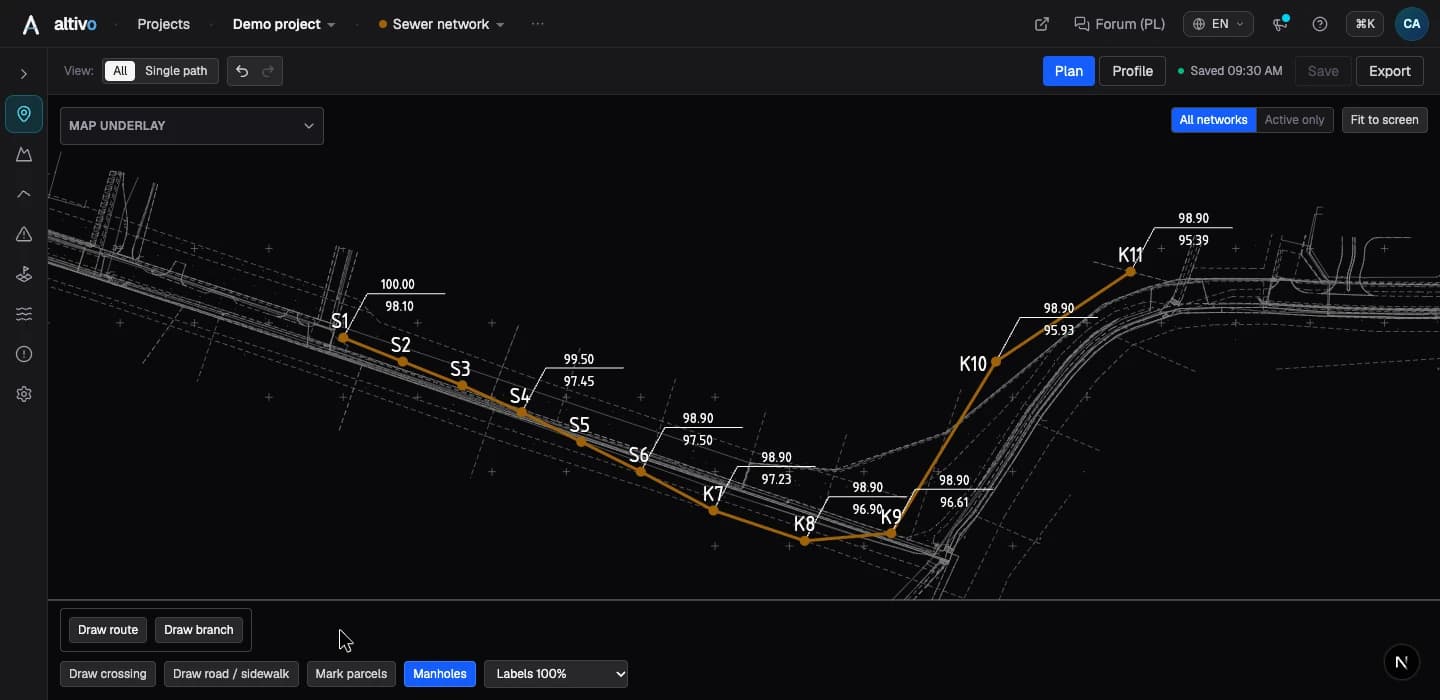
Design directly in plan view: draw routes and branches, snap to base-map geometry and control direction and dimensions.
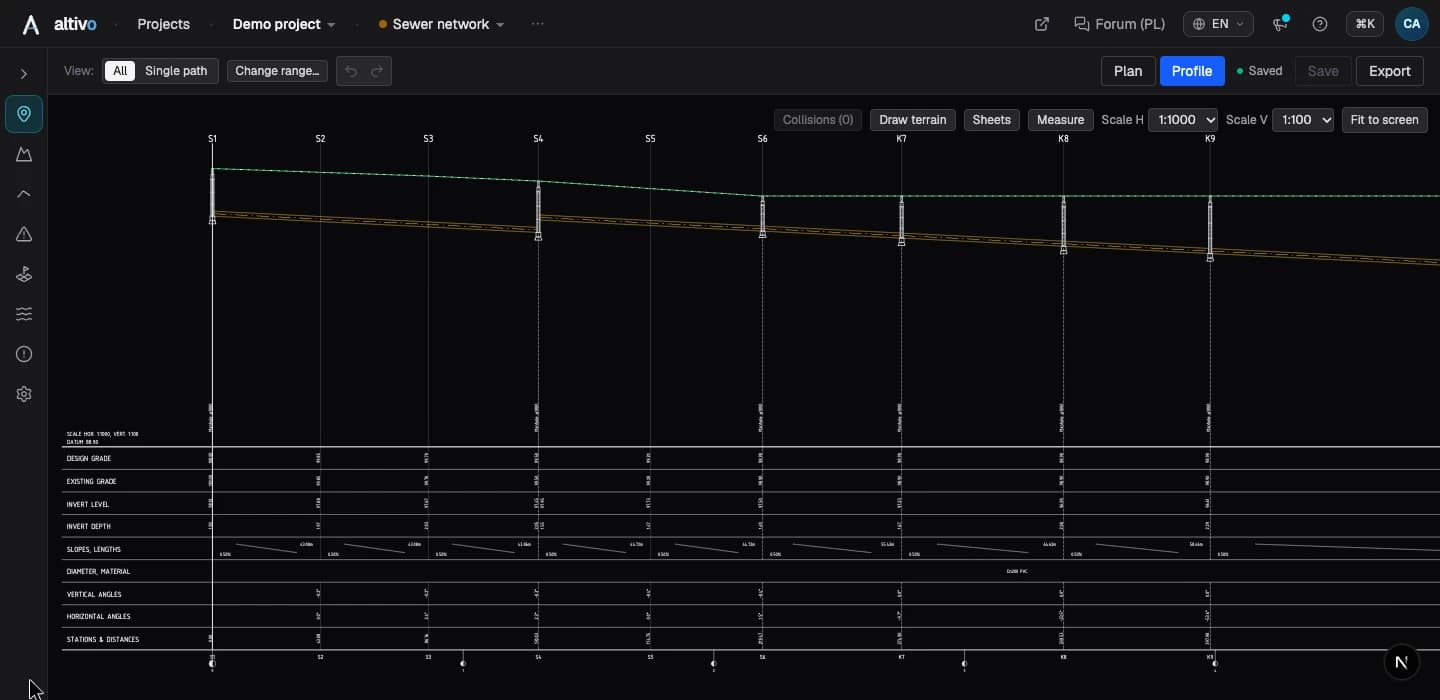
Long section detail — ground, pipe and manholes, with a table of elevations, gradients and chainage.
A DXF ready for further CAD work
Open the file and keep layers, text and route range under control from the start.
Layers
P_WATER_ROUTE
Separate layers for networks, labels, elevations, crossings and tables.
Text
MText
Labels stay editable after opening the file in CAD.
Range
0+120 - 0+460
Export the whole profile or only the selected route section.
Offset
0,0
Large coordinates are shifted closer to zero for more stable work.
Dual scale
Separate horizontal and vertical (e.g. 1:500 / 1:100), generated automatically from the route range. You pick the starting and ending stationing before export.
Editable MText
Labels are not exploded into line segments — in CAD you change the text in one click. No retyping, no OCR-ing your own drawing.
Layers prefixed by industry
P_WATER_ROUTE, P_SEWER_ELEVATIONS, P_GAS_LABELS. Every network and every drawing type has its own layer — you control visibility and colour independently.
Coordinates normalised to zero
Large coordinates can reduce precision in some CAD tools. The export automatically subtracts an offset computed from min(X), min(Y) — the DXF opens near 0,0.
3D export: IFC & 3D DXF
You can also download the same project as a 3D model. The IFC file carries EPSG georeferencing and loads into Revit via “Link IFC” and other BIM tools, while the 3D DXF — pipe axes and simplified solids sized by diameter — works as an underlay in AutoCAD or Civil 3D.
Seven industries, sensible defaults
Create a new network and you already have the right parameters. Every default can be overridden per network, per segment, per point.
Gravity sewage
- depth
- 2.0 m
- diameter
- 200 mm
- material
- PVC
Pressure sewer
- depth
- 1.6 m
- diameter
- 90 mm
- material
- PE 100
Water supply
- depth
- 1.6 m
- diameter
- 110 mm
- material
- PE 100
Gas
- depth
- 1.0 m
- diameter
- 63 mm
- material
- PE 100
District heating
- depth
- 1.0 m
- diameter
- 100 mm
- material
- preinsulated steel
Power cable
- depth
- 0.8 m
- diameter
- 50 mm
- material
- YAKXS
Telecom cable
- depth
- 0.8 m
- diameter
- 32 mm
- material
- HDPE
Application defaults. Editable at every level — from a single network down to a single point.
Simple pricing for real design work
Full access to projects, data import and DXF export. The trial lasts 14 days and does not require a payment card.
- ✓ 14 days free
- ✓ No card required
- ✓ VAT invoice
Introductory prices currently apply. A purchase adds a full period to your access.
Auto-renewing subscription — cancel any time.
Monthly
A flexible plan for one designer and current project work.
1 seat
Gross price, VAT included. Reverse charge for EU businesses with a VAT-ID.
Regular price: €59.00
Introductory pricing currently applies ↗
- Unlimited projects
- Draw on a base map; import DXF routes and points
- Export plan and profile to DXF
- Water, sewage, gas, district heating, power and telecom in one project
- Updates included
Yearly
Best when Altivo becomes part of your regular design workflow.
1 seat
That's about €39.17/mo — 20% cheaper than the monthly plan
Gross price, VAT included. Reverse charge for EU businesses with a VAT-ID.
Regular price: €590.00
Introductory pricing currently applies ↗
- Everything in the monthly plan
- 20% cheaper than paying monthly
- Price locked for 12 months
- DXF export without project-count friction
- Priority CAD workflow improvements
- One invoice for the whole year
Team
For design offices that need multiple seats and a shared organisation.
2+ seats
- Shared organisation and team members
- Access for multiple designers
- Transparent pricing tiers for 2 to 50 seats
- A no-obligation quote request without a sales call
Questions a reviewer would ask
Concrete answers, no marketing.
What input formats do you accept?
What about the coordinate system?
Where is my data?
Does it work with BricsCAD and ZWCAD?
Can I export a range of the route?
Can I export a 3D model for BIM?
Do I need a dongle or a per-station licence?
Do you issue VAT invoices for companies?
Can I import a DXF or a background map?
The app is missing a feature I need. What should I do?
Is the app available in other languages?
Is Altivo long section profile software?
Start with your own map or route
Try for freeTry route drawing, profile design and export on your own project. 14 days, no payment card required.